

|
|
| Правила Форума редакция от 22.06.2020 |
|
|||||||
|
|
Окажите посильную поддержку, мы очень надеемся на вас. Реквизиты для переводов ниже.   WMZ: Z021474945171 WME: E159284508897 WMUSDT: T206853643180 WMZ: Z021474945171 WME: E159284508897 WMUSDT: T206853643180 4100117770549562 Спасибо за поддержку! 4100117770549562 Спасибо за поддержку!
|
|
 |
|
|
Опции темы | Опции просмотра |
 Language
|
 27.11.2006, 00:00
|
 #1
#1
|
|
Ветеран
 
Пол: 
Регистрация: 18.11.2006
Адрес: Киевская Русь
Сообщений: 9,017
Репутация: 84746
|

Прикольно описанна технология создания цепочек и т.д. в PhotoShop[I][B]
1 Create a new layer and make a retangular selection  2 Select the linear gradient tool and the copper gradient. 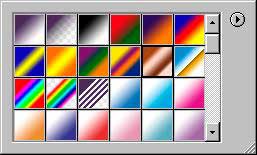 3 Drag from the top to the bottom of the selection, you now have a copper pipe.  4 For this excercise we want a chrome pipe, so suck all the color out by going Shift+Ctrl/Cmd+U to desaturate the image. Or select desaturate from the menu.  5 Now to make it more shiny chrome, open our famous curves box and use a similar curve.  6 And we now have a shiny Chrome pipe..  7 To add the segments: Create a new layer and draw a 2 pixel line in black.  8 Duplicate the layer and press Ctrl/Cmd+I to invert the color, press the right keyboard arrow key 2x to nudge the white line over. Change it to overlay mode in the layer mode menu. Link the 2 lines and merge linked. Alt/Option+Shift and drag the lines to duplicate them along the pipe. 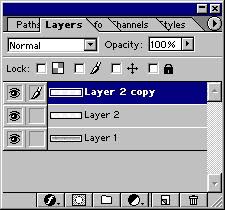 9 Here is a finished one with some color added by using hue/saturation with the colorize box checked.  |

|

|
|
|
| Реклама: |
|
 Похожие темы
|
||||
| Тема | Автор | Раздел | Ответов | Последнее сообщение |
| Технология лекарств | Dogmatist | Фармация / Фармакология | 63 | 27.06.2015 09:09 |
| HDR технология | Ripley | Программы для обработки | 3 | 29.10.2009 00:18 |
| Технология | Pinochet | Русская музыка | 0 | 09.12.2006 00:22 |
|
|


 Линейный вид


